
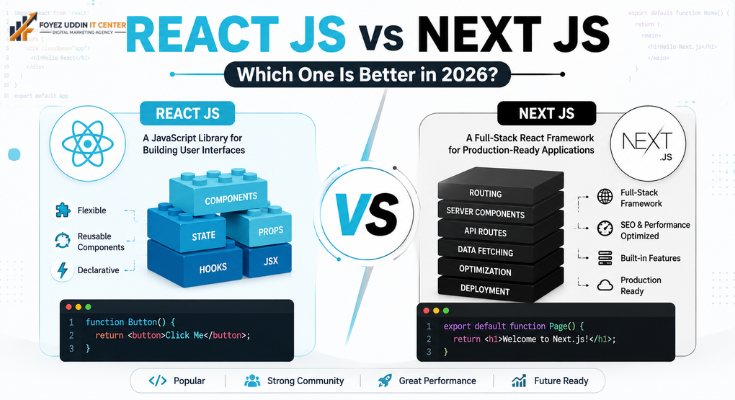
If you’re starting a new web project, you’ve probably typed “React.js vs Next.js” into Google at least once. It’s one of the most common questions among JavaScript developers today, and for good reason, both tools dominate modern front-end development. In this guide, we’ll break down the React.js vs. Next.js debate in detail so you can make the right choice for your next project.
What Is React.js?
React.js is a free, open-source JavaScript library from Meta (yep, the old Facebook). Its job? Building user interfaces, especially single-page apps. Think of it as the “view layer” of your app. Nothing more, nothing less.
React.js hands you a component-based setup. You build small, reusable UI pieces and snap them together like Lego blocks. Here’s the thing people often miss in React.js vs. Next.js conversation: React.js is a library, not a framework. That means no built-in routing. No server-side rendering. No file-based pages. You have to bring those yourself.
What Is Next.js?
Next.js comes from the team at Vercel, and it’s a full React framework, not just a library. It’s actually built right on top of React.js. That’s honestly where a lot of the React.js vs Next.js confusion starts. People assume you’re picking one over the other, but Next.js doesn’t replace React.js at all. It just builds on it.
So what does Next.js bring to the table? Server-side rendering. Static site generation. API routes. Image optimization. File-based routing. None of that ships with plain React.js; you’d have to wire it all up yourself.
React.js vs. Next.js: Key Differences
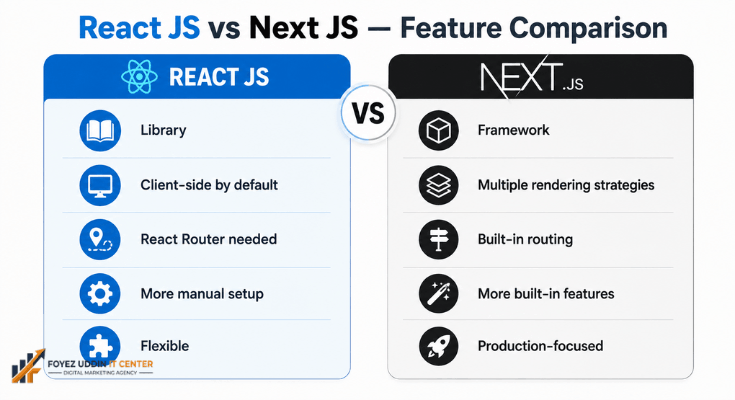
Alright, let’s get into the nuts and bolts. Here’s what actually separates React.js from Next.js, the stuff that matters when you’re picking one for your project.
Rendering Approach
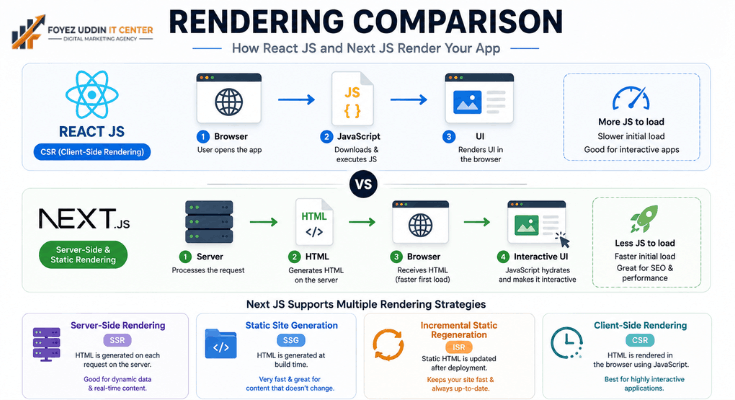
This is probably the biggest split in the whole React.js vs Next.js debate. React.js renders everything on the client side by default. That’s called Client-Side Rendering, and it can leave your users staring at a blank screen while things load. Next.js does it differently. It gives you server-side rendering, static site generation, and incremental static regeneration. That’s a real win if performance is your priority.
SEO Performance
Want better SEO? Next.js takes this round easily. It pre-renders your pages on the server, so search engines can crawl and index everything without a fight. Plain React.js apps need extra help to get there, tools like React Helmet or a custom SSR setup just to keep up.
Routing
Here’s another spot where React.js and Next.js part ways. React.js doesn’t handle routing on its own. You need a separate library, usually React Router, to make navigation work. Next.js skips that step entirely. Drop a file into the pages or app folder, and boom, Next.js turns it into a route automatically.
Performance and Speed
Speed matters, and this is where Next.js pulls ahead again. It handles code splitting, image optimization, and lazy loading right out of the box. With React.js, you’re setting all of that up yourself if you want the same results.
Learning Curve
New to this? React.js is the friendlier starting point. It’s just a UI library, so there’s less to wrap your head around. Next.js asks more of you. Server components, API routes, and hybrid rendering; it’s a bigger learning curve, no question.
Use Cases
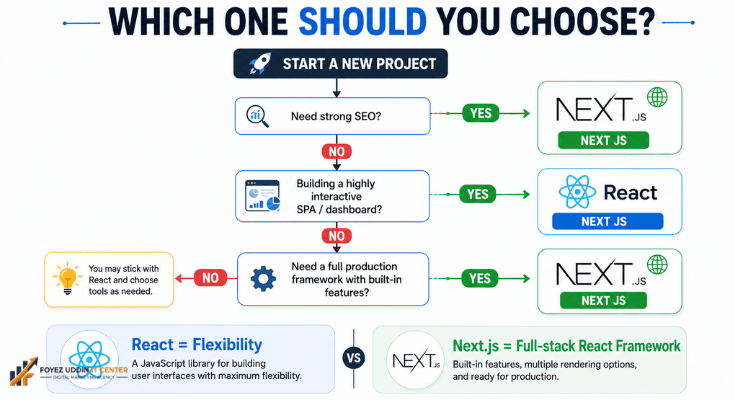
So when do you reach for which one? React.js shines when you’re building dynamic single-page apps, dashboards, or interactive UI pieces. Next.js is your pick for content-heavy sites, online stores, blogs, or anything where SEO drives traffic.
Deployment and Hosting
Deployment looks pretty different too. React.js apps usually ship as a static bundle; you can drop them on almost any web server or CDN. Next.js was built with platforms like Vercel in mind, and it supports serverless deployment, edge functions, and hybrid hosting setups. If your team plans infrastructure ahead of time, this difference actually matters a lot.
Community and Ecosystem
Good news on this front: both have strong communities behind them. React.js has built up one of the biggest ecosystems in web development, packed with libraries and tools for just about anything. Next.js gets to piggyback on all of that while stacking its own growing set of plugins on top. Together, that combo makes for a seriously solid toolkit when you’re building something at scale.
Pros and Cons: React.js vs. Next.js
Sometimes the easiest way to decide is to just line up the good and the bad. So here’s React.js and Next.js, side by side.
React.js Pros:
- Light and flexible
- A massive community with tons of libraries to lean on
- You call the shots on how your app is structured
React.js Cons:
- No SSR or routing built in
- You’ll need extra setup to nail SEO
Next.js Pros:
- SSR, SSG, and routing are all included
- SEO performance that’s genuinely excellent
- Fast page loads without lifting a finger
Next.js Cons:
- It takes more time to learn
- Not as flexible if you want a highly custom setup
Honestly, this simple breakdown is what tips the scale for a lot of developers choosing between React.js and Next.js.
React.js vs. Next.js: Which Is More Popular?
So who’s winning the popularity contest? Next.js has been on a serious growth streak lately, especially with businesses that care about SEO and speed. But don’t count React.js out; it’s still the more widely used of the two overall, quietly powering a massive number of apps that never touch Next.js at all.
Here’s the real takeaway: this isn’t really a battle where one tool knocks the other out. It’s more that React.js and Next.js just solve different problems, and both are still winning in their own lane.
React.js vs. Next.js: Comparison Table
| Feature | React.js | Next.js |
| Type | Library | Framework |
| Rendering | Client-side by default | SSR, SSG, ISR, CSR |
| Routing | Requires React Router | Built-in file-based routing |
| SEO | Needs extra setup | SEO-friendly out of the box |
| Performance | Manual optimization needed | Optimized automatically |
| Learning Curve | Easier | Moderate to steep |
Is Next.js Just React.js With Extra Steps?
Fair question, and I get why people ask it. You hear “Next.js is built on React.js” and figure it’s just React.js wearing a fancier outfit. Not quite the case, though.
Try this comparison instead: React.js is the engine. Components, logic, and UI rendering; that’s all happening under the hood. Next.js is the whole car built around it. Wheels, dashboard, and navigation all work together right out of the box.
So calling it “extra steps” undersells it. React.js gives you the raw parts and lets you build things your way. Next.js takes those same parts and hands you a finished setup for routing, rendering, and SEO so you’re not reinventing the wheel every single time.
Same engine either way. The difference is how much of the car you have to assemble yourself.
Do You Lose Anything by Choosing Next.js Over Plain React.js?
A little, honestly. It’s not some magic free upgrade.
Control is the main thing you give up. Next.js has opinions on how to organize your files, how routing behaves, and how rendering plays out. If you’re someone who likes doing things your own way, that can feel a bit boxed in at first.
There’s more happening beneath the surface too. Plain React.js is pretty transparent; what you write is what you get. Next.js piles on extra layers: server components, multiple rendering modes, and build-time versus runtime choices. That can make debugging a headache when something breaks.
And yeah, there’s the learning curve too. Getting comfortable with Next.js just takes longer than diving straight into React.js.
Still, for most projects, the trade works out in your favor. You give up a bit of freedom and take on some extra complexity, and in return you get speed, better SEO, and a bunch of features you’d otherwise have to build by hand. Most teams come out ahead on that deal.
Can You Switch From React.js to Next.js Later, Once Your App Grows?
Definitely, and it happens more than people realize. Plenty of teams kick things off with plain React.js because it’s quick and simple. Then SEO becomes a priority, or the app scales up and performance starts mattering, and that’s usually when Next.js enters the picture.
Here’s the good part: you’re not rebuilding from scratch. Next.js sits on top of React.js, so your components carry over. All that logic and UI work you already did? Still counts.
What actually needs rework is the structure around it, your routing setup, and how your pages render. It takes effort, no doubt. But it’s a world away from starting over completely.
Does Next.js Slow You Down as a Developer, Even If It Speeds Up Your App?
At the start, kind of, yeah. You’re picking up new concepts: server components, rendering strategies, and file-based routing, and none of that sinks in overnight. So early on, you might genuinely move slower than you would with plain React.js.
Push through that phase, though, and things turn around fast. Once it clicks, Next.js tends to save you time overall. No more manually wiring up routing. No more hand-coding image optimization or code splitting. Next.js just takes care of it.
So it’s less that Next.js slows you down and more that it asks for some upfront investment. Put in the work early, and it pays off later.
Is It Worth Learning Next.js If You Already Know React.js Well?
Almost always, yes. And here’s why it’s not as big a lift as it sounds: you’ve already cleared the hardest part. React.js is the foundation, and you’ve got that locked down. Next.js just builds on skills you already have.
There’s a practical angle too. Tons of job postings and freelance gigs specifically ask for Next.js now, not just React.js. Learning it opens more doors, and you don’t have to start from square one to get there.
Bottom line: if you already know React.js, picking up Next.js isn’t starting over. It’s leveling up.
Conclusion
So, is one actually better? Not really, it all comes down to what you’re trying to do. React.js gives you flexibility and puts you in the driver’s seat for your app’s architecture. Next.js takes that same foundation and adds better performance, stronger SEO, and a smoother developer experience without all the manual setup.
Care about SEO and speed? Next.js is your best bet. Want something lightweight where you build your own UI logic from scratch? React.js still holds up great. Either way, once you understand how these two actually relate to each other, picking the right one for your next project gets a whole lot easier.
FAQs
Is Next.js better than React.js?
Not really “better.” Next.js is literally built on React.js. It really comes down to what you need: want extras like SSR and SEO baked in? Go with Next.js. Want a lightweight library for building your UI your way? Stick with React.js.
Can I use React.js and Next.js together?
You actually already are if you’re using Next.js. It’s a framework built right on top of React.js, so React.js is working under the hood no matter what.
Which is better for SEO, React.js or Next.js?
Next.js takes this one. Its server-side rendering and static generation help search engines index your content way faster.
Is Next.js harder to learn than React.js?
Yeah, usually. React.js is simpler to pick up since it’s just a library. Next.js throws in more routing, SSR, and API routes, so there’s a bit more to learn.
Should beginners start with React.js or Next.js?
Start with React.js. Most experts say so, and it makes sense. Next.js is built on it, so learning React.js first gives you a solid base before you move on.
Is the React.js vs Next.js debate even worth having, since Next.js uses React.js anyway?
Fair question. It’s not really about picking a permanent side. It’s more about knowing when plain React.js gets the job done and when Next. JS’s extra features are actually worth the trade-off.
Which one’s better for large-scale production apps?
For big, SEO-heavy, production-grade projects, Next.js usually wins. Its performance optimizations and built-in tooling make it the go-to for that kind of scale.




One Comment on “React.js vs Next.js: Which Is Better for Developers in 2026?”