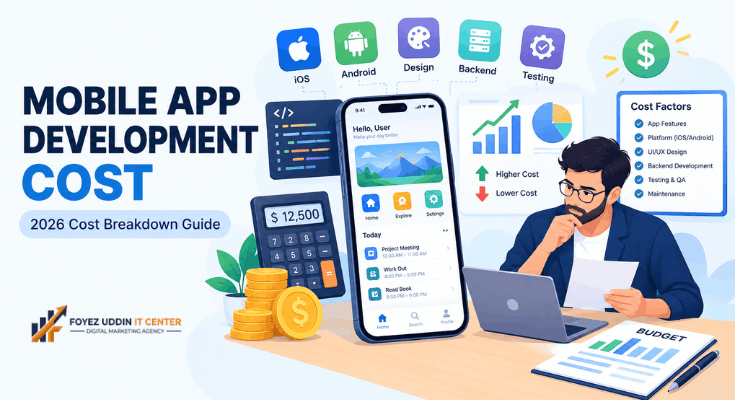
Building an app sounds expensive. However, the real number depends on many small choices.
This mobile app development cost breakdown will walk you through every piece of the puzzle. You do not need any coding knowledge to follow along.
By the end, you will understand exactly what you are paying for. You will also know how to avoid overspending using this mobile app development cost breakdown as your guide.
Why Mobile App Development Cost Breakdown Matters
Most beginners ask one question first: “How much will my app cost?” Unfortunately, there is no single answer.
Prices range from a few hundred dollars to hundreds of thousands. Therefore, a mobile app development cost breakdown helps you set realistic expectations.
A clear cost breakdown also protects you from hidden fees. For example, some developers quote a low price but add charges later for updates or bug fixes.
The Main Factors in Any Mobile App Development Cost Breakdown
Several factors shape your final bill. Let’s look at each one closely, since every mobile app development cost breakdown starts here.
App Complexity
Simple apps cost less. Complex apps cost more. This is the first variable in any mobile app development cost breakdown.
- Basic apps: A menu, a contact form, or a simple calculator. These are cheap and fast to build.
- Mid-level apps: User accounts, payment systems, or booking features. These require more development hours.
- Complex apps: Real-time chat, GPS tracking, or AI-powered recommendations. These need specialized skills and take much longer.
Platform Choice
You can build for iOS, Android, or both. Each choice affects the price differently, and it’s a key line item in your mobile app development cost breakdown.
- Native apps (built separately for iOS and Android) tend to perform best. However, they often cost more because two versions must be built.
- Cross-platform apps (built once, deployed everywhere) usually cost less. For example, tools like Flutter or React Native let developers reuse code.
- Progressive Web Apps (PWAs) are the cheapest option. They run in a browser but feel like an app.
Your choice should match your goals. For example, a restaurant app for local customers may only need Android. A retail app targeting a wider audience may need both platforms.
Design Requirements
Basic templates are affordable. Custom, branded designs cost more.
Small businesses often start with template-based designs. This keeps early costs low in your mobile app development cost breakdown. You can always upgrade the design later.
Backend and Database Needs
Does your app need to store user data? Does it need to sync across devices?
If yes, you will need a backend system and a database. This adds both development time and ongoing hosting costs to your mobile app development cost breakdown.
Developer Location and Experience
Freelancers charge different rates than agencies. Location also plays a huge role in your mobile app development cost breakdown.
- Developers in the US or Western Europe typically charge $50-$200 per hour.
- Developers in Eastern Europe or Latin America often charge $25-$75 per hour.
- Developers in South Asia may charge $15-$50 per hour.
Lower rates do not always mean lower quality. However, communication and time zones can become challenges.
Typical Mobile App Development Cost Breakdown by App Type
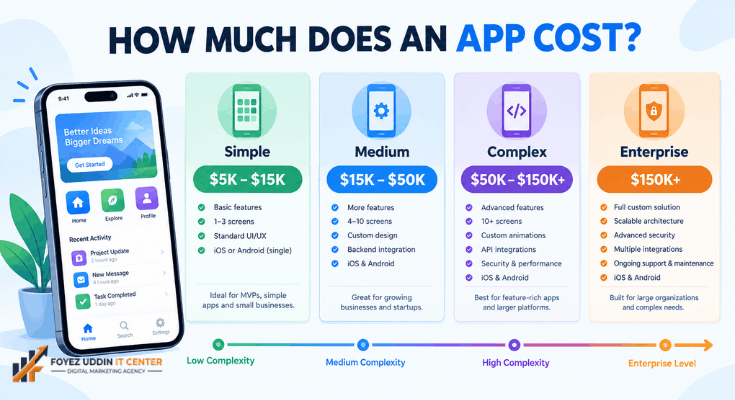
Here is a general price range for different app types. These are estimates, not fixed quotes.
- Simple app (no login, no backend): $5,000-$15,000
- Medium complexity app (user accounts, basic backend): $15,000-$50,000
- Complex app (payments, real-time features, custom design): $50,000-$150,000+
- Enterprise-level app (advanced security, integrations): $150,000 and up
These numbers may seem high. Fortunately, small businesses have cheaper alternatives.
Feature-by-Feature Cost Breakdown
Individual features add up quickly. Here is a rough guide to common features and their typical cost impact.
- User login and registration: $1,000-$5,000. Costs rise with social login or two-factor authentication.
- Push notifications: $500-$2,000. This is a relatively affordable feature.
- In-app payments: $2,000-$10,000. Costs depend on the payment provider and security requirements.
- GPS or location tracking: $2,000-$8,000. Real-time tracking costs more than basic location display.
- Chat or messaging: $3,000-$12,000. Real-time chat requires extra backend work.
- Admin dashboard: $3,000-$15,000. This lets you manage users and content without a developer.
Knowing these figures helps you prioritize. For example, you might launch without chat and add it later.
Freelancer vs. Agency vs. In-House Team
You have three main hiring options. Each comes with trade-offs.
- Freelancers: Usually the cheapest option. However, availability and reliability can vary.
- Agencies: Offer full teams and structured processes. As a result, they typically charge more but reduce project risk.
- In-house developers: Best for long-term projects. However, salaries and benefits make this the most expensive short-term option.
Small businesses often start with freelancers or small agencies. This keeps initial costs manageable.
No-Code and Low-Code Options for Small Budgets
You do not always need a custom-built app. Many small businesses succeed with no-code tools.
- App builders like Adalo or Glide let you create functional apps without writing code.
- Website-to-app converters turn your existing website into a mobile app.
- Template marketplaces offer pre-built app designs you can customize.
These options can reduce your cost to under $1,000. Therefore, they are a great starting point for beginners.
When to Move From No-Code to Custom Development
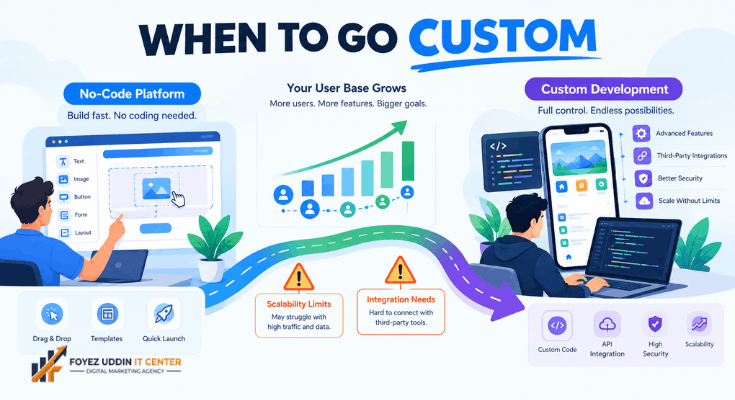
No-code tools work well for early-stage ideas. However, they have limits.
Consider custom development when your app needs advanced security. Also consider it when you need deep integrations with other business systems.
High user volume can also be a signal. For example, some no-code platforms slow down or become expensive at scale.
There is no fixed rule for when to switch. Instead, watch for recurring limitations that block your growth. If you keep hitting the same wall, it may be time to invest in custom code.
Hidden Costs Most Beginners Forget
A true mobile app development cost breakdown must include ongoing expenses. Many people forget these.
- App store fees: Apple charges $99 per year. Google charges a one-time $25 fee.
- Hosting and server costs: Expect $20-$500 per month, depending on traffic.
- Maintenance and updates: Budget 15-20% of your original build cost per year.
- Marketing: Getting users to download your app costs money too.
- Third-party integrations: Payment gateways, maps, or analytics tools often charge monthly fees.
Ignoring these costs is a common mistake. As a result, many businesses run out of budget within the first year.
A Simple Example Budget Scenario
Imagine a small business wants a basic booking app. It needs user login, a calendar, and simple notifications.
This falls into the medium complexity category. A realistic estimate might look like this.
- Design: $3,000
- Login system: $2,500
- Booking calendar: $4,000
- Notifications: $1,000
- Testing: $1,500
- Total estimate: Around $12,000, before ongoing hosting and maintenance.
This is only an example. Your actual quote will depend on your developer, region, and exact features.
A Step-by-Step Budgeting Checklist
Before requesting quotes, prepare your own budgeting checklist. This keeps conversations with developers focused.
- List your must-have features. Separate these from “nice-to-have” ideas.
- Decide your platform priority. Choose iOS, Android, or both based on your audience.
- Set a realistic timeline. Rushed projects often cost more.
- Research average rates in your region. This helps you spot unfair quotes.
- Set aside a maintenance fund. Do not spend your entire budget on the initial build.
- Get at least three quotes. Comparing options helps you understand fair market pricing.
Following this checklist reduces guesswork. It also helps developers give you an accurate estimate faster.
How to Reduce Your App Development Costs
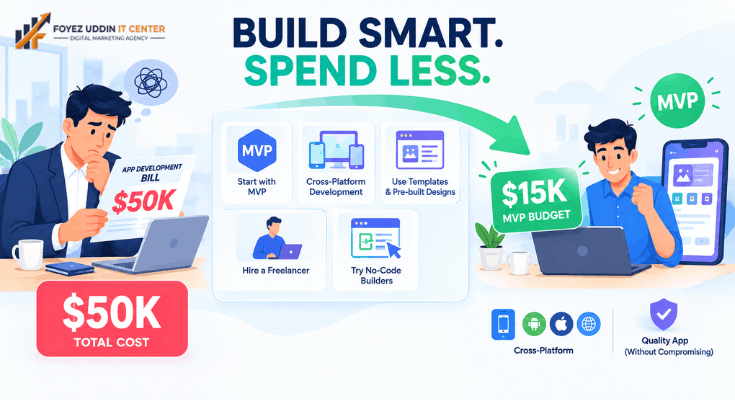
You can lower your costs without sacrificing quality. Consider these strategies.
- Start with an MVP (Minimum Viable Product). Build only the core features first.
- Use cross-platform frameworks instead of building two separate native apps.
- Choose a template-based design instead of a fully custom one.
- Hire freelancers for smaller tasks and agencies for complex work.
- Test no-code tools first before investing in custom development.
For example, many successful apps launched as simple MVPs. They added features only after gaining real users.
How Development Timelines Affect Cost
Time and cost are closely linked. Longer projects usually mean higher bills.
- Discovery and planning: 1-2 weeks. This phase defines features and scope.
- Design phase: 2-4 weeks. This includes wireframes and visual design.
- Development phase: 4-16 weeks, depending on complexity.
- Testing and quality assurance: 1-3 weeks. Skipping this step often leads to costly fixes later.
- Launch and submission: 1-2 weeks. App store review can add extra time.
A simple app might be ready in two months. A complex app can take six months or more.
Common Budgeting Mistakes Small Businesses Make
Many businesses lose money through avoidable errors. Being aware of these helps you plan better.
- Underestimating maintenance costs. Many owners forget ongoing expenses after launch.
- Choosing the cheapest developer without checking reviews. Low prices can sometimes mean lower quality work.
- Adding too many features at launch. This increases both cost and delay.
- Skipping a written contract. Clear agreements prevent scope disputes later.
- Not testing on real devices. Simulators do not always catch every bug.
Avoiding these mistakes keeps your project on budget. It also reduces stress during development.
Reviewing this list before you start is a small step. However, it can save thousands of dollars over the life of your project.
Questions to Ask Before Hiring a Developer
Before you sign any contract, ask these questions. They will save you money later.
- What is included in the quoted price?
- Are updates and bug fixes included after launch?
- How many revision rounds are included in the design phase?
- What happens if the project timeline extends?
- Who owns the source code after completion?
Clear answers prevent surprise charges. Consequently, you stay in control of your budget.
Final Thoughts on Mobile App Development Cost Breakdown
Understanding a mobile app development cost breakdown helps you plan smarter. It also helps you avoid overspending on features you do not need yet.
Start small. Test your idea. Then scale up as your business grows.
Use the checklist and feature costs above as your starting point. Compare a few quotes before making a final decision.
Whether you choose a no-code tool or hire a developer, knowledge is your best budgeting tool. A clear mobile app development cost breakdown turns a confusing process into a manageable plan. Now you have it.
Frequently Asked Questions
How much does a basic app cost for a small business?
A basic app with no login or backend typically costs $5,000-$15,000. However, no-code tools can bring this under $1,000.
Is it cheaper to build for iOS or Android first?
Android development is often slightly cheaper. For example, Apple’s stricter design and review process can add extra hours.
How long does it take to build a small business app?
A simple app usually takes 4-8 weeks. Complex apps can take 4-6 months or longer.
Can I build an app myself without coding skills?
Yes. No-code platforms like Adalo or Glide let beginners build functional apps. Therefore, coding is no longer a strict requirement.
What is the biggest hidden cost in app development?
Ongoing maintenance surprises most beginners. Budget 15-20% of your build cost every year for updates and fixes.
Do I need a backend for a simple business app?
Not always. If your app only displays information, a backend is unnecessary. However, apps with logins or payments need one.
Should I get multiple quotes before choosing a developer?
Yes. Getting at least three quotes helps you understand fair pricing. It also reveals which developers ask the right questions about your business.