
The AI advantage for students isn’t hype anymore; it’s a real, measurable head start for anyone willing to use the right free tools the right way. Between research, writing, coding, language practice, and test prep, there’s now a genuinely free AI assistant for nearly every part of a student’s workload.
This guide breaks down exactly which tools deliver that advantage without costing anything, what their free-tier limits actually look like, and how to build a simple daily study stack instead of juggling ten different apps.
More importantly, this guide draws a line between tools that build real skill and tools that just produce a finished answer. The AI advantage for students only holds up long-term if the tools you pick still leave you smarter than when you started.
What the AI Advantage for Students Actually Means
For most students, the AI advantage isn’t about doing less work; it’s about spending less time on the parts of studying that don’t actually teach you anything: reformatting notes, hunting for sources, or re-reading a textbook chapter for the third time.
Used well, free AI tools compress that overhead so more of your actual study time goes toward understanding the material, not managing it.
Used poorly, the same tools can quietly erode the skills they’re meant to support. This guide leans toward tools and habits that build understanding rather than replace it.
There’s also a practical side to the AI advantage for students that’s easy to overlook: cost. Tutoring, premium study guides, and paid research databases can run into hundreds of dollars a semester. Free AI tools don’t replace all of that, but they close a meaningful part of the gap, which matters most for students who don’t have that budget to begin with.
Research & Study Synthesis Tools
Research used to mean hours of scattered searching. These tools cut that time down without cutting corners on source quality.
Perplexity
Perplexity works as an AI-powered search engine that answers questions with cited, checkable sources instead of a single unverified paragraph, genuinely useful when you need to confirm a fact fast or find a starting point for a paper. Full details are on the official Perplexity site.
- Best for: Fact-checking, finding credible sources, and quick topic overviews.
- Free-tier limits: Unlimited basic searches; advanced “Pro” search modes are capped monthly.
- Standout feature: Every answer comes with clickable, cited sources.
NotebookLM
NotebookLM, built by Google, turns uploaded readings, lecture notes, and PDFs into summaries, study guides, and even a conversational audio overview, a genuine time-saver before an exam. See the official NotebookLM page for current limits.
- Best for: Summarizing long readings and generating study guides.
- Free-tier limits: Generous document upload allowance for a free tool.
- Standout feature: Turns dense notes into an audio-style discussion you can listen to.
This is where the AI advantage for students shows up most clearly. Research that used to take an entire evening now takes an hour.
Quick Take: The AI Advantage for Students in Research
Pair Perplexity for finding sources with NotebookLM for digesting them together; they cover both ends of the research process without needing a library database login.
Writing & Editing Support
Writing assistants are the most commonly used student tools, and for good reason: they shorten the gap between a rough idea and a clean draft.
Claude
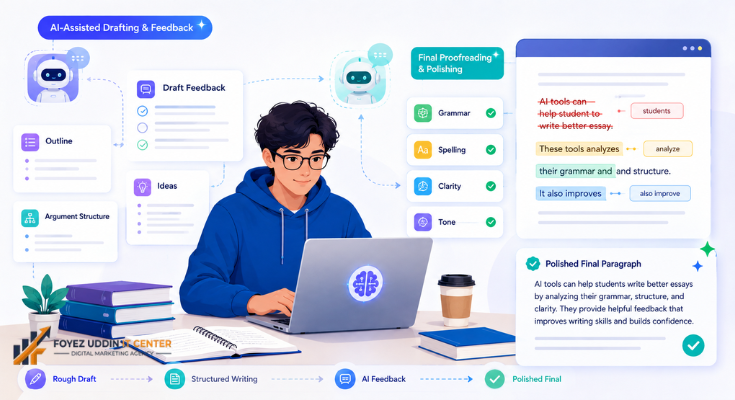
Claude helps with outlining essays, tightening arguments, and explaining feedback on a draft in plain language, useful for students who want editing help without simply having the assignment written for them. This kind of feedback loop is a big part of the AI advantage for students who write regularly, since it builds the skill instead of skipping it. Learn more on the official Anthropic site.
- Best for: Essay outlines, argument structure, plain-language feedback on drafts.
- Free-tier limits: Daily message caps that reset regularly.
- Standout feature: Strong at explaining why a piece of writing works or doesn’t.
Grammarly
Grammarly catches grammar, clarity, and structural issues before a paper gets submitted, acting as a last-pass editor rather than a writing generator. Current plan details are on the official Grammarly site.
- Best for: Final proofreading before submission.
- Free-tier limits: Core grammar and spelling checks; advanced tone suggestions are paid.
- Standout feature: Works inside the browser and most word processors automatically.
Quick Take: The AI Advantage for Students Who Write Often
Use Claude for structure and feedback while drafting, then run the final version through Grammarly, as order matters more than most students realize, since polishing a weak structure just makes a weak argument look tidier.
Coding & STEM Learning Tools
Technical subjects show a different side of the AI advantage for students: tools that explain why code or a formula works, not just what the answer is.
GitHub Copilot
GitHub offers free access to Copilot for verified students through its education program, giving real-time code suggestions and explanations while working on assignments or personal projects. For computer science students specifically, this is where the AI advantage for students becomes obvious: the fastest debugging that used to take an hour can take minutes. Eligibility and details are on the official GitHub Education page.
- Best for: Computer science students learning to code faster and debug smarter.
- Free-tier limits: Free with verified student status; the standard free tier has monthly completion limits otherwise.
- Standout feature: Suggests and explains code directly inside your existing editor.
Khan Academy (Khanmigo)
Khan Academy’s AI tutor, Khanmigo, walks students through math and science problems step by step instead of just handing over the answer, which keeps the learning intact. Availability varies by school district and region, so verify current access on the official Khan Academy site.
- Best for: Step-by-step help with math, science, and test prep.
- Free-tier limits: Access depends on school or district partnerships. Verify current pricing and availability.
- Standout feature: Guides students to the answer instead of just providing it.
Between these two, the AI advantage for students in STEM subjects comes less from getting faster answers and more from getting better explanations, the kind a stretched-thin teacher doesn’t always have time to give one-on-one.
Language & Communication Practice
Consistent, low-pressure practice is what actually builds language skill, and free AI-driven apps make that practice easier to stick with.
Duolingo
Duolingo’s core app is free and uses AI-driven exercises that adapt to your mistakes, making daily language practice feel more like a five-minute habit than a chore. See the official Duolingo site for details on paid AI features versus the free tier.
- Best for: Building a daily language-learning habit.
- Free-tier limits: Full core app is free; some AI conversation features are part of a paid tier.
- Standout feature: Adaptive lessons that adjust difficulty based on your actual mistakes.
For international students, especially, this is a quiet but real part of the AI advantage for students, steady skill-building without needing a tutor or a class fee.
Loecsen
Loecsen strips language learning down to short audio-visual phrasebooks. You hear a phrase, see it written out, and repeat it back, which suits people who want to sound natural in real conversations fast rather than grind through grammar drills. It’s not adaptive the way Duolingo is, but it’s simple, quiet, and doesn’t nag you about a streak. Details are on the official Loecsen site.
- Best for: Learning practical, everyday phrases for travel or casual conversation.
- Free-tier limits: Core phrasebook lessons are free; verify current pricing for any expanded content.
- Standout feature: Short audio-visual phrase drills instead of long grammar-based lessons.
LingoHut
LingoHut takes a more structured, lesson-by-lesson approach across dozens of languages, and most of its content is free to use without even needing an account. It’s a good fit for students who want a straightforward curriculum to work through rather than a gamified app. See the official LingoHut site for the full course list.
- Best for: Working through vocabulary systematically, language by language.
- Free-tier limits: Most lessons are free to access; verify current pricing for any premium content.
- Standout feature: Dozens of languages organized into clear, structured lesson tracks.
Neither Loecsen nor LingoHut markets itself as AI-powered the way Duolingo does, so if adaptive, mistake-driven practice is what you’re after, Duolingo still has the edge there. But if you’ve bounced off Duolingo before and just want something quieter and more direct, both are genuinely free and worth ten minutes to see if the format fits you better.
For international students, especially, this is a quiet but real part of the AI advantage for students, steady skill-building without needing a tutor or a class fee.
Productivity & Time Management Tools
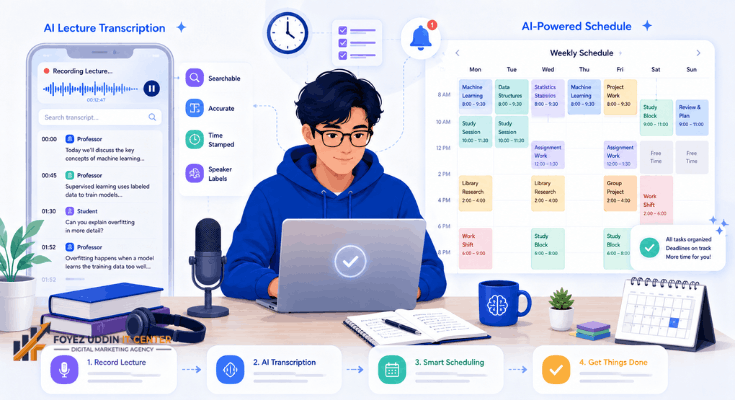
Half the stress of school isn’t the material; it’s keeping track of it. These tools handle the logistics so nothing slips through the cracks.
Otter.ai
Otter.ai transcribes lectures and meetings in real time, turning a 90-minute class into a searchable, text-based summary you can review in minutes instead of re-listening to a recording. Details are on the official Otter.ai site.
- Best for: Transcribing and summarizing lectures automatically.
- Free-tier limits: Limited monthly transcription minutes.
- Standout feature: Searchable transcripts with automatic speaker labeling.
Google Calendar’s AI Scheduling
Google’s built-in AI scheduling assistant helps map out study blocks around classes, deadlines, and commitments automatically, which matters more than it sounds once midterms and part-time work start overlapping. See Google’s official Workspace page for current feature availability.
- Best for: Building a realistic weekly study schedule.
- Free-tier limits: Core scheduling features are free with any Google account; some AI features are tied to Workspace plans. Verify current availability.
- Standout feature: Automatically finds open time blocks across a full class and work schedule.
Study Organization & Test Prep
Staying organized is half the battle, and these tools handle the administrative side of studying so you don’t have to.
Quizlet
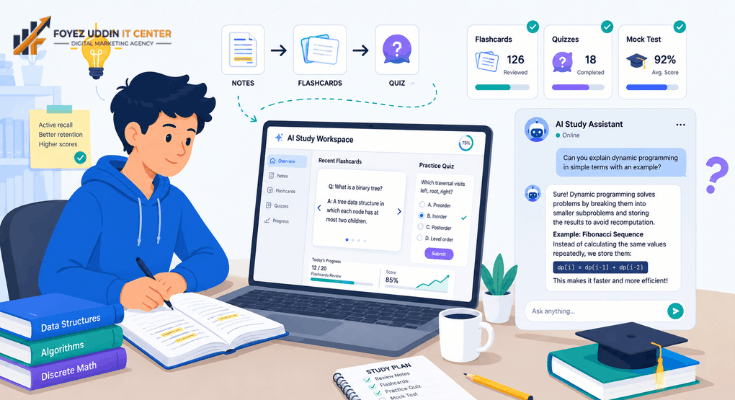
Quizlet’s AI-powered study modes generate flashcards and practice questions from your own notes automatically, saving the time it takes to build a deck by hand. Details are on the official Quizlet site.
- Best for: Turning class notes into flashcards and practice quizzes automatically.
- Free-tier limits: Core flashcard and study tools are free; some AI-generation features have monthly caps.
- Standout feature: Auto-generates study sets directly from pasted notes.
ChatGPT (Free Tier)
OpenAI’s free ChatGPT tier works as a general-purpose study companion explaining concepts, quizzing you on material, or breaking down a confusing textbook passage in simpler terms. Check current limits on the official OpenAI site.
- Best for: General Q&A tutoring across subjects.
- Free-tier limits: Usage caps during high-demand periods; access to newer models is limited on the free plan.
- Standout feature: Broad subject coverage in a simple conversational format.
How These Tools Were Chosen
The AI advantage for students only holds up if the tools behind it are actually free, not a trial disguised as a permanent plan. Every tool on this list had to offer real, ongoing free access, transparent usage limits, and a genuine use case for schoolwork rather than a gimmick feature.
Tools that required a credit card just to test the free plan, or that buried real limits behind vague marketing language, were left off. Where access depends on a school partnership or student verification, like GitHub Education or Khanmigo, that’s noted clearly so you’re not caught off guard.
We also weighed how each tool affects actual learning, not just convenience. A tool that hands over a finished essay doesn’t offer much of an AI advantage for students in the long run; even if it saves time tonight, it just moves the cost of not understanding the material to exam day instead.
Final Thoughts
The AI advantage for students isn’t about outsourcing thinking; it’s about spending less time on the parts of studying that were never really teaching you anything in the first place. Research, writing feedback, coding help, language practice, scheduling, and test prep all have a genuinely free AI option now.
Start with one tool per category rather than adopting all nine at once. A research tool, a writing assistant, and one subject-specific helper are usually enough to feel the difference within a week.
The real AI advantage for students shows up over a semester, not a single assignment. Small, consistent time savings across research, writing, and organization add up to hours of your week back by midterms.
Revisit this list each semester; free-tier limits and student program eligibility shift often enough that it’s worth a quick check before finals.
Frequently Asked Questions
Is the AI advantage for students only useful for college-level work?
No, the AI advantage for students applies at nearly any level, from high school research papers to graduate coursework. The tools scale with the complexity of the task rather than requiring a certain grade level.
Will using these tools count as cheating?
It depends entirely on your school’s policy and how you use the tool. Tools like Grammarly for proofreading or Perplexity for source-finding are generally considered study aids, while having a tool write an entire assignment usually isn’t. When in doubt, check your syllabus or ask your instructor directly.
Do I need all nine tools to see the AI advantage for students in my own routine?
Not at all. Most students notice a real difference after adopting just two or three, typically one research tool, one writing assistant, and one subject-specific helper.
Are any of these tools completely free forever, or will they eventually charge?
Most operate on a “freemium” model, meaning the core features stay free indefinitely while advanced features sit behind a paid tier. That’s different from a time-limited trial, which is why each tool above was checked specifically for a permanent free plan.
How do I know if the AI advantage for students is actually working for me?
A simple test: if you can explain the material to someone else without looking at your notes, it’s working as intended. The tool saved you time without replacing your understanding. If you can only recognize the answer but not explain it, it’s worth slowing down and using the tool differently, more as a tutor than a shortcut.